

The short answer
Which is the right fit?
Choose Flow if you want a permanent free starting point, unlimited websites, and five ways to assign credit for a purchase. Choose DataFast if its visitor intelligence, goals, AI agent tools, or longer retention matter more to you.
01 / The snapshot
At a glance
| What matters | Flow | DataFast |
|---|---|---|
| Free access | Ongoing Free plan, 10,000 events per month | 14-day free trial; subscription after trial |
| Entry plan shown | $5 per month for 100,000 events | $9 per month for 10,000 events on its default pricing view |
| Websites | Unlimited on every listed plan | One on its listed Starter plan; 30 on Growth |
| Revenue analysis | Five selectable attribution models | Revenue attribution, goals, funnels, and visitor journeys |
| Data history | 12 calendar months on every plan | Three years on listed Starter; five or more on Growth |
Flow plans and features come from the current product. Competitor details are based on the official sources below, reviewed 2026-09-25.
02 / The detail
One purchase, several useful answers
A customer might arrive from search, return through an email, and buy after a direct visit. Flow lets you view that same journey through first click, last click, linear, time decay, or position-based attribution. The total purchase value stays the same; the model changes how credit is divided among eligible touches.
DataFast also centers its product on revenue attribution. It adds goals, funnels, detailed visitor journeys, and a Payment API. It would be misleading to treat it as a basic pageview counter. Flow is a good fit when your team wants to compare attribution lenses directly in one workspace; DataFast may suit teams that want its wider visitor and automation toolkit.
03 / The detail
The difference when a site is still small
Flow Free includes 10,000 events each month. It also includes unlimited websites, five attribution models, CSV exports, and 12 months of history. Flow Starter is $5 per month for 100,000 events. DataFast currently shows a 14-day trial, then a $9 monthly Starter offer at its default 10,000-event setting. Its pricing changes with event volume, so compare the allowance you will actually use.
A free plan can make experimentation easier: add a site, verify the tracker, and decide whether checkout attribution is worth wiring up before paying. Revenue matching still needs a supported payment connection and your checkout to pass Flow’s visitor context. Neither product can infer a purchase journey that your site never sends.
04 / The detail
Where DataFast may be the better fit
DataFast advertises a longer history on its listed paid plans, Google Search Console insights, a mobile app, and API, CLI, and MCP access. It also has a broad payment integration story, including a custom Payment API. If those are central to your workflow, its higher listed entry price may be justified.
Flow keeps its offer focused: hosted traffic and revenue reports, campaign detail, live activity, exports, and explicit attribution model controls. If those are the decisions you need to make every week, start with the free tier and evaluate the reports with your own data.
05 / The detail
What the Flow analytics workspace includes
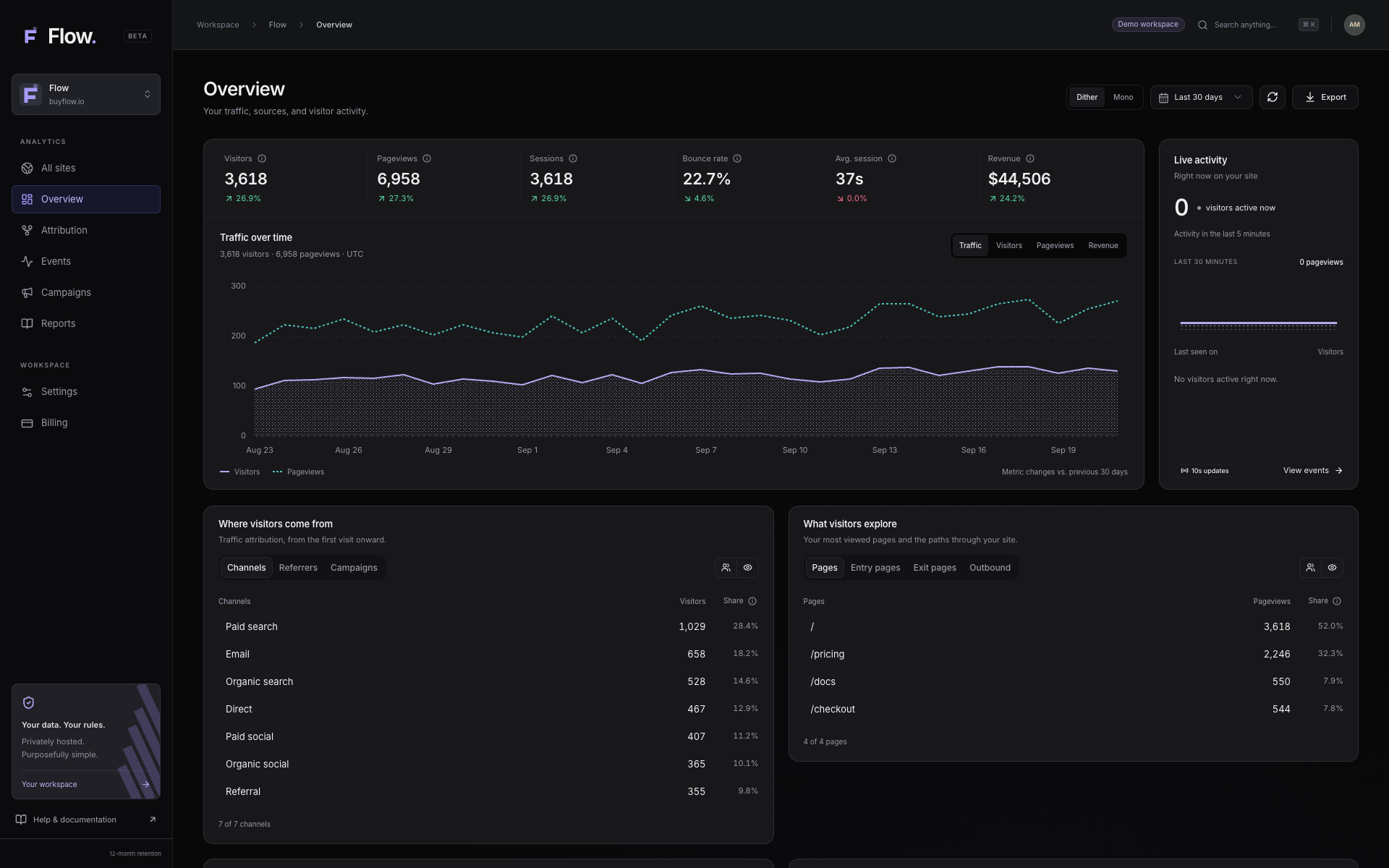
The All sites dashboard gathers visitors, pageviews, revenue, and purchases for every website in one workspace. Open a site to inspect traffic sources, entry and exit pages, devices, and activity over time. Live visitor counts and a searchable event stream help you check that tracking works before you draw conclusions from a campaign.
Flow also creates UTM campaign links and reports visitors, pageviews, conversions, and attributed revenue by campaign. Its Reports view shows top pages, device mix, and an activity heatmap. You can print a report or export data as CSV. These are useful checks for a product launch, newsletter, or paid campaign, even before you connect a payment provider.
Flow Free includes these website analytics tools for up to 10,000 events each month across unlimited sites. When you are ready to match sales to visits, connect Stripe, Polar, Paddle, Dodo, Creem, or Lemon Squeezy and pass the visitor context through checkout. You can inspect traffic first and add revenue attribution when the sales path is ready.
A closer look
What the Flow workspace shows
See Flow in action
Flow attribution in action
An animated Flow demo with sample data. It changes the attribution model and shows how credit shifts between channels while total revenue stays the same.
Read the video description
An animated Flow demo with sample data. It changes the attribution model and shows how credit shifts between channels while total revenue stays the same. The video is an animation of product controls, not a recording of a competitor or a claim about real customer results. It has music and no spoken narration.
Questions
Questions people ask
Is Flow a free DataFast alternative?
Yes. Flow has an ongoing Free plan with 10,000 events per month. DataFast offers a 14-day trial and requires a subscription afterward.
Does Flow attribute revenue automatically?
Tracking visits starts with one snippet. Revenue attribution also requires a supported payment provider and a checkout link to the visitor context.
Does DataFast have attribution features?
Yes. DataFast offers revenue attribution, goals, funnels, and visitor journeys. The products differ in plan structure and workflow, not in whether they can report revenue.
Can I use Flow without connecting payments?
Yes. The tracker can collect visits and site events first. Flow needs a supported payment connection and checkout visitor context before it can match purchases to those visits.
Source notes
Check the details
Competitor plans and features change. These links lead to the source pages used for this comparison.